
Apple’s secret release of the 5th Generation iPod Touch yesterday was like a ninja attack: silent, swift, and unexpected. But we always have our spudgers at the ready and we quickly got the Touch to spill its glorious gadget guts.

The recently-released iPhone 5’s modular design ranked high on our repairability scale, so we had lofty hopes for the Touch. Our hopes were swiftly dashed, though. With no external screws, the Touch is tough to pry open, and its logic board utilizes two hard-to-manage ribbon cables: the battery, logic board, front camera, speaker, headphone jack, Lightning connector, and home button switch are all soldered onto one cable, while the volume buttons, power button, LED flash, and rear microphone are all attached to another cable. Repair is not impossible, but it’s certainly going to be difficult and expensive if one component breaks. These factors combined earned the iPod a 3 out of 10 on our repairability scale (10 is easiest to repair).
The highlights:
- The 5th Gen iPod Touch has 512 MB of RAM.
- In case you thought that a quick zap with the heat gun and a gentle pry is all it would take to get into the Touch, think again! There are several clips and adhesive holding this iPod together.
- Along with a 4-inch (diagonal) screen, a 5-megapixel iSight camera, and 32 GB or 64 GB storage capacity, the new iPod Touch also sports a retractable post for “the loop.” With any luck, this loop will prevent the unintentional iPod “drop test” that often results in shattered hopes and screens.
- How does the 5th Generation iPod Touch stack up to the iPhone 5? Well, literally speaking, they’re fairly well matched in terms of size. The new iPod Touch shares the same height (within a ± .01 inch difference) as the iPhone 5.
- The volume buttons/microphone/LED flash/power button ribbon cable assembly peels easily from the rear case. We’ve seen this type of design in previous Apple products. The shift to a single ribbon cable is more cost-effective for the manufacturer, but unfortunately it has a negative impact on repairability.
- Cables connected to the logic board run over the top and connect on the bottom, making it difficult to remove the board or disconnect the cables.
- In our recent iPhone 5 teardown, we praised Apple for redesigning a stronger home button. We were somewhat disappointed with the weaker, rubber-membrane design of the iPod Touch’s home button.
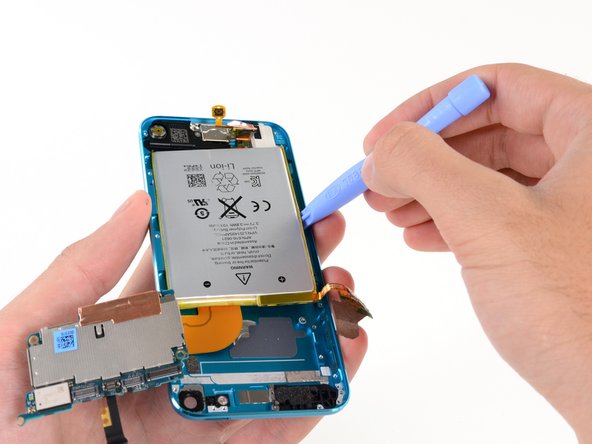
- The battery inside the Touch is secured with just the right amount of adhesive—and is again soldered to the logic board. This Plain Jane battery provides 3.8 Whr at 3.7 V for a rating of 1030 mAh, a little more than the previous model’s 930 mAh.
- The iPod Touch finally shows us what’s up its sleeve:
* A5 Processor
* Hynix H9TKNNN4KDBRCR 512 MB RAM
* Toshiba THGBX2G8D4JLA01 32 GB NAND flash
* Apple 3381064 dialog power management IC
* Murata 339S0171 Wi-Fi module
* Broadcom BCM 5976 touchscreen controller
* Apple 33831116
* STMicroelectronics AGD32229ESGEK low-power, three-axis gyroscope
* Texas Instruments 27AZ5R1 touchscreen SoC

For all the teardown guts and glory, check out the full teardown here.


0 Comments