Note: We are in the process of merging the iFixit.com and iFixit.org blogs, so please bear with us. This post is a product announcement from Miro, our Director of Technical Communication, for a kit that lets you install a second drive into your Mid 2011 iMac. Adding an SSD to your Mac can help extend the life of the device and greatly speed up its performance. -Elizabeth
Our most-recent iMac 21.5″ teardown revealed an interesting tidbit: unused mounting points that were curiously in the shape of a 2.5″ hard drive. After a bit of investigating, we found that all Mid 2011 21.5″ and 27″ iMacs can accept an additional hard drive, regardless of whether or not Apple will let you outfit your machine with a second drive.
However, all was not peaches and roses. We also found that although some iMacs may have mounting holes for hard drive brackets, others don’t. Which is unacceptable! Users should be able to upgrade their iMacs to dual drives if the functionality is there.
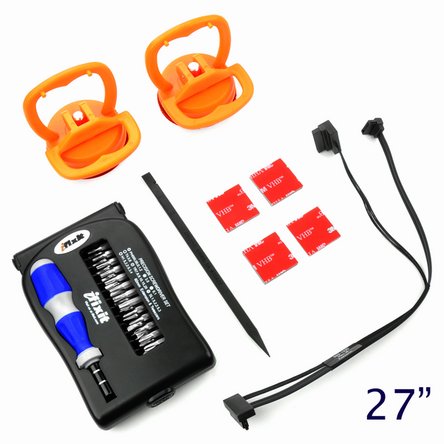
Enter the 21.5″ iMac and 27″ iMac Dual Hard Drive kits. These self-install kits work on all Mid 2011 21.5″ and 27″ iMacs. (If you’re unsure of which model you have, definitely ID your Mac before purchasing a kit.) You’ll be able to install OS X on an SSD for lightning fast startup times, while still being able to use your original hard drive for mass storage (and your optical drive for spinning those CDs).
Each kit comes with:
We’ve combined all the components you need and set the price at $69.95. And you’ll be able to use the clearest, bestest instructions on the planet to perform this install –– for free. Check out the 21.5″ iMac and 27″ iMac dual hard drive installation manuals to get a feel for the install process; the instructions are as clear as can be, but the procedure is still pretty involved since you have remove the LCD to get inside.
Comments
Please make a Mac mini version dual hard drive kit!
Love It!!! :-)))
@frikova Your wish is my command.
Here is the Mac Mini Dual Hard Drive Kit for those who are interested: http://www.ifixit.com/Apple-Parts/Mac-Mini-Dual-Hard-Drive-Kit/IF171-005
Hello, is the 27″ data/power cable sold separatedly? I already have the other tools.
Do you have any solution for dual hard drives for a 24″ 2009 iMac?
Hi,
is it possible to buy just the SATA power cable, the SATA data cable and the Custom-cut 3M VHB double-sided mounting tape? I’m located in Germany and we repair Macs. We have all other tools and it would be great to offer a way to upgrade iMacs to our customers.
How did you resolve the fans running at full speed on the Mid-2011 iMacs? I had to send mine to OWC because they had a kit to resolve that issue and my iMac works great super fast.
Just put temperature sensor from the optical drive back on the SSD drive. If don’t put the sensor back, your mac doesn’t get a temperature and will automatically run the fans on high speed!
Is there a kit for the iMac 27″ mid 2010?
Can you add another mass storage HDD or is this for SSD addition only?
I’m also interested in a Mid2010 kit to add an SSD to my iMac11,3. Will this solution work?
What are the main benefits of SSD over other forms of hard drive? I keep meaning to look into adding one to my laptop, but I just don’t know of the benefits. I have heard that you can get some bigger performance leaps by putting your OS on the SSD. Is that true?
You guys are just in the nic of time! So I can get any 2.5″ SSD for this? Looking at:
http://eshop.macsales.com/shop/SSD/OWC/Mercury_6G/
I second the request for an affordable Mid2010 kit.
I would also be interested in hearing if this would work for the mid 2010 iMacs….
I’m VERY interested in adding an SSD to my 27″ iMac 11.1!
Are there any reasons this kit won’t work?
If so, what will cause a problem?
If it doesn’t work, I really hope to see a kit soon!
I’ve got a 27″ mid-2010 iMac as well. Any chance that this option will be available for that model?
This sounds great! Am I limited to only installing a SSD drive? I would rather get a higher capacity magnetic drive for the storage capacity and reduce clutter of external drives.
Does this upgrade cause the fan to run at full speed all the time, or does the fan run normally?
I would really like an official answer to the question of fans running hi if you don’t have the proper apple approved/sold drive upgrade… can someone from iFixit answer?
So is anyone from iFixit going to answer the question, if you can use this for a 2010 27 inch iMac. I know it was a option when I bought I just want to add the HD myself like the people with the 2011 iMac can….
Please let us know if we can order the cable from this kit and if it will work in the 2010 iMac 27 inch i7.
work on mid 2010 imac?
Unfortunately, we haven’t yet tested the kit on mid-2010 iMacs! If we do, I will update ASAP to let everyone know.
if it will work on a mid 2010 iMac I’ll buy it immediately!
Like he most people, I also woud like to have this kit for iMac-2010. iFix team can you please do some reasearch on this. Thank you
Ok folks, I was more excited than I was cautious and I purchased this kit for my late 2009, 27″ iMac. It is model 11,1, with the i7 processor.
I ripped it all apart thanks to the great instructions found above, only to find that there is no extra SATA connector on the main board. Ugh. There are mounts for one… I wonder if the board supports it?
Now I am stuck with an expensive SSD drive and a kit that doesn’t connect. My thoughts:
1) Find a SATA surface mount connector and put it on the main board… attach SSD and see what happens
2) Remove current internal drive and replace with SSD
If iFixIt can set me up with the proper connector and a real soldering iron, I will try number 1. My home iron is crap.
Note to those who do crack open their systems. I had lots of trouble getting the main board back in, until I took out my RAM chips. Highly recommend that you do this when you are trying to get it back together…
Also, for the 2009-2010 variants, there are a few different cables and minor location adjustments. The biggest change is the large wide cable that goes to the center of the display. You need to squeeze the small metal hasps on the connector to get it to release. I damaged mine a bit because I couldn’t see, but it still works.
Does this apply to mid 2010 iMacs too?
What about the fan issue? Do issues remain with this kit, or is it taken care of? Thanks!
does it works with imac 27″ late 2009 ?
Wondering if it works on the 2010 model also?
Another enquiry… Any news re mid 2010 imac 21.5?
I have a 2011 i5 . I due audio recording. What happens to the fan speed and noise once you have installed a additional SSD drive with your kit. I want top purchase everything today because of the black friday sales. Are there any over heating issues?
Comments are closed